Android app out now Computer use for phones

Give your AI thumbs

Claude Code and Codex use a real phone the way you do, in every app you're signed into.

Download the appAPK · 19 MBJoin the iPhone early access

Scan with your phone to download it there

iPhone, or no spare phone? All the ways to start
9:41● ● ●
Messages
Bank
Chat
Rides
Mail
Food
Pay
Calendar
Shop
Maps
Photos
Health

Messages

From: Bank

Your sign-in code is 482 913. It expires in 10 minutes.
  1. 01Messages · copy the code
  2. 02Bank · sign in with it
  3. 03Chat · reply to Sam
  4. 04Rides · book the ride
Works withClaude CodeCodexCursorAny MCP clientOur own on-device model

Get started

Which phone will your agent use?

Android 10+ · free

I have an Android phone

Download the app (APK)19 MB
  1. 1Open the download and install it. Android asks once to allow installs from your browser.
  2. 2Open Opposable and turn it on in Settings › Accessibility.
  3. 3Tap Connect, then paste the command it shows into Claude Code.

On a computer? Scan with your phone's camera to download it there.
Beta · about $8–13 in parts

I have an iPhone

The Opposable Stick is a tiny Bluetooth stick for your Mac, Windows or Linux computer. Your iPhone pairs with it as a keyboard and pointer, so your agent can tap and type in every app. No jailbreak, no app on the phone. Buy a stick from the maker and install our firmware from your browser in about a minute.

Set up a Stick

From $19/mo

No spare phone

Rent a private Android phone in our cloud. Sign into your apps once in the browser, then connect your agent over MCP.

See cloud phones

01Pricing

Free and open source. Pay for remote access and the extras

Everything that runs on your phone is free. You pay for what is annoying to host yourself: the relay, approvals and sync.

Free

$0

Open source. Your phone, your network, your model.

  • The phone app, its MCP server and REST API
  • Common tasks with no model: alarms, timers, contacts, texts, settings, search
  • Bring your own model: on-device, Claude or any OpenAI-compatible API
  • USB or same Wi-Fi, unlimited tasks and recipe replays
  • Payments always wait for your Approve tap

Pro

Founding offer

$8/mo

Reach your phone from anywhere. $79 a year; founding members $5/mo for life.

  • Hosted relay: Claude Code reaches your phone on mobile data or any Wi-Fi
  • Scheduled tasks and webhooks while your laptop is closed
  • Approve or deny payments from the phone's notification
  • Audit log of everything your agents did
  • Recipes backed up and shared across your phones (up to 3)
  • Automatic recipe repair when apps update coming
  • iPhone via a Mac coming

Power

$29/mo

For people running agents on several phones.

  • Everything in Pro, up to 10 phones
  • Audit log across phones
  • 2,000 managed model steps a month included coming
  • Shared recipe library for a small team coming
  • Priority recipe repair coming

02Cloud phones

No spare phone? Rent one in the cloud, from $19 a month

A private virtual Android phone you sign into once. Some banking apps refuse to run on virtual phones; your own phone has no such limits.

Founding cohort pricing: early cloud-phone subscribers keep their launch price for as long as they stay subscribed

Cloud Starter

$19/mo

One phone that sleeps when idle and wakes on the next MCP call

What's included
  • 1 virtual Android 15 phone (2 vCPU burst, 3 GB RAM)
  • 60 active phone-hours/month, then $0.15/h
  • Auto-sleeps after 5 min idle, wakes on the next MCP call
  • MCP endpoint for Claude Code / Codex
  • Browser screen viewer to install apps and sign in
  • 1 backup snapshot

Cloud Always-on

Most picked

$49/mo

One always-on phone for agents that work around the clock

What's included
  • 1 always-on virtual Android 15 phone (2 vCPU, 3 GB RAM)
  • Unlimited phone-hours (fair use)
  • Background agents & notifications keep running
  • MCP endpoint + browser screen viewer
  • 32 GB app storage
  • Daily snapshots, 7 kept, one-click restore

Cloud Team

$149/mo

Three always-on phones for parallel agents or separate accounts

What's included
  • 3 always-on virtual Android 15 phones (2 vCPU, 3 GB RAM each)
  • Unlimited phone-hours (fair use)
  • Shared team access & per-phone token rotation
  • MCP endpoints + browser screen viewers
  • 32 GB storage per phone
  • Daily snapshots, 7 kept per phone
  • Priority support

03Signed into everything you are

Most of your life runs through phone apps, and none of them have an API

Messages

Grab the code

Reads the 2FA text the moment it lands and types it where it's needed

Bank

Pay the bill

Opens your banking app, checks the amount, and stops for your OK before paying

Chat

Answer the group

Replies in your chat apps in your voice, with the whole thread in mind

Rides

Get you home

Books the ride, picks the pickup point, sends you the driver's ETA

Shop

Reorder the usual

Finds last week's grocery order and puts it back in the basket

Inbox

Clear the morning

Archives, replies, and moves the invites into your calendar

Money never moves without you

Payments and purchases stop and wait for your Approve tap, on every plan. Your agent does the twenty taps; you make the one that matters.

04How it works

Everything your thumbs can do, as tools your agent already knows

Over USB, over Wi-Fi, or from anywhere through the relay: the phone keeps one outbound connection, so there is no port to forward.

It sees

A screenshot, plus the screen as a list of labelled elements with their positions. Cheap enough to read on every step.

[17] TextView "Dark theme"
[18] TextView "Display & touch"  @(288,811)
[19] Switch  desc="Dark theme"   @(517,922)
     clickable, unchecked

It acts

Taps, swipes, typing in any language, system keys, opening apps and links. Every call reports what it actually did.

tap_element  index | text
swipe        up | down | left | right
type_text    "Zürich ✓", submit
launch_app   "Chrome"
press_key    back | home | enter

You choose the brain

Drive it from Claude Code or Codex over MCP, or hand the whole task to the agent built into the app.

claude-code   via MCP
codex         via MCP
claude / gpt  in-app, your key
opposable     in-app, on-device

One line to connect

The app shows its address and a token. Paste one command and the phone is a tool in your next session.

claude mcp add --transport http phone https://<id>.opposable.run/mcp \
  --header "Authorization: Bearer <token>"

05Delegate it

Tell your phone what to do, get back done or not done

Your agent hands the phone a task, the phone does it locally, and only the result comes back.

$ curl phone/api/do -d '{
    "task": "check my bank balance" }'

{ "status": "done",
  "result": "Checking account: EUR 2,418.30",
  "seconds": 11.2 }

Call it any way

MCP for Claude Code and Codex, or a plain REST endpoint and webhooks for cron jobs, n8n and Zapier

Runs on its own

Schedule a task daily or every few minutes. The phone wakes, does it, and messages you the outcome

Learns your routines

Done once, saved as a recipe and replayed with no model in a few seconds

Gets past the walls

Reads the 2FA code from your texts, clears the pop-ups, and asks you only for the one tap a person has to make

06Recorded runs

Watch it work, unedited

Screen recordings of real agents on a real Android phone, with their actual timings and costs.

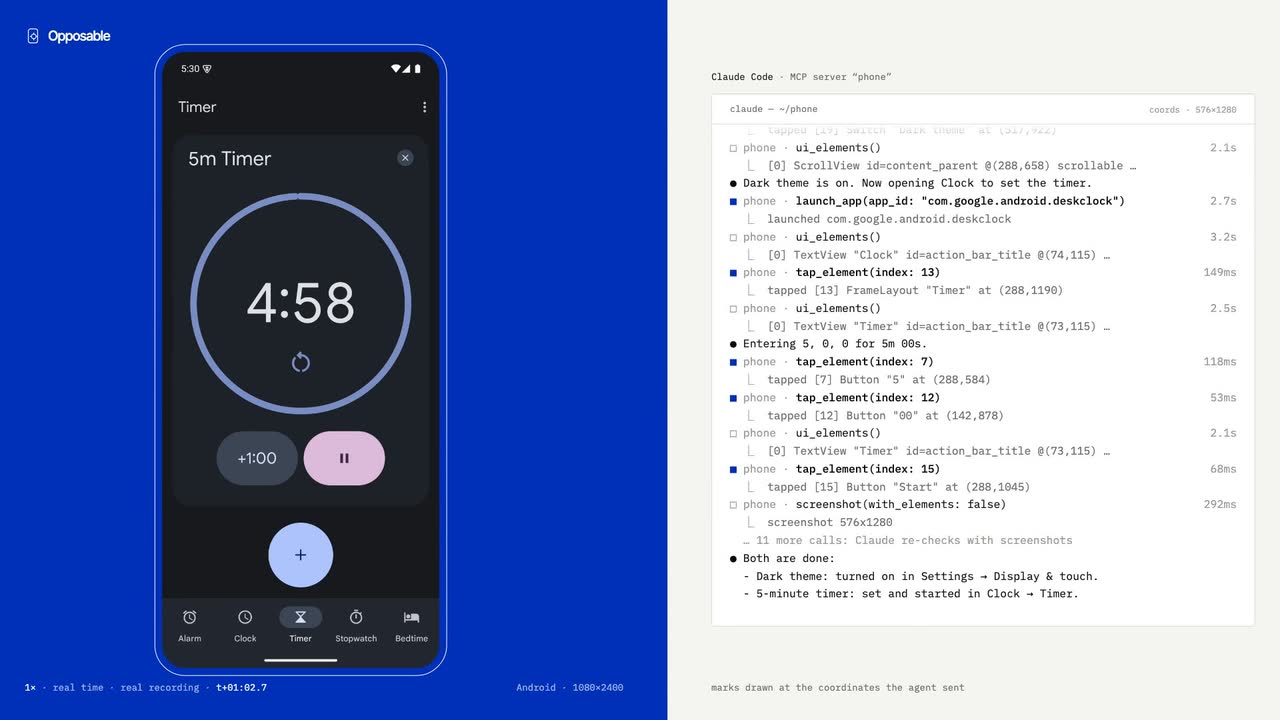
Dark theme on, then a five-minute timer

Agent
Claude Code over MCP
Task
Settings › Dark theme, then Clock › 5 min timer
Run
50 s · 17 tool calls

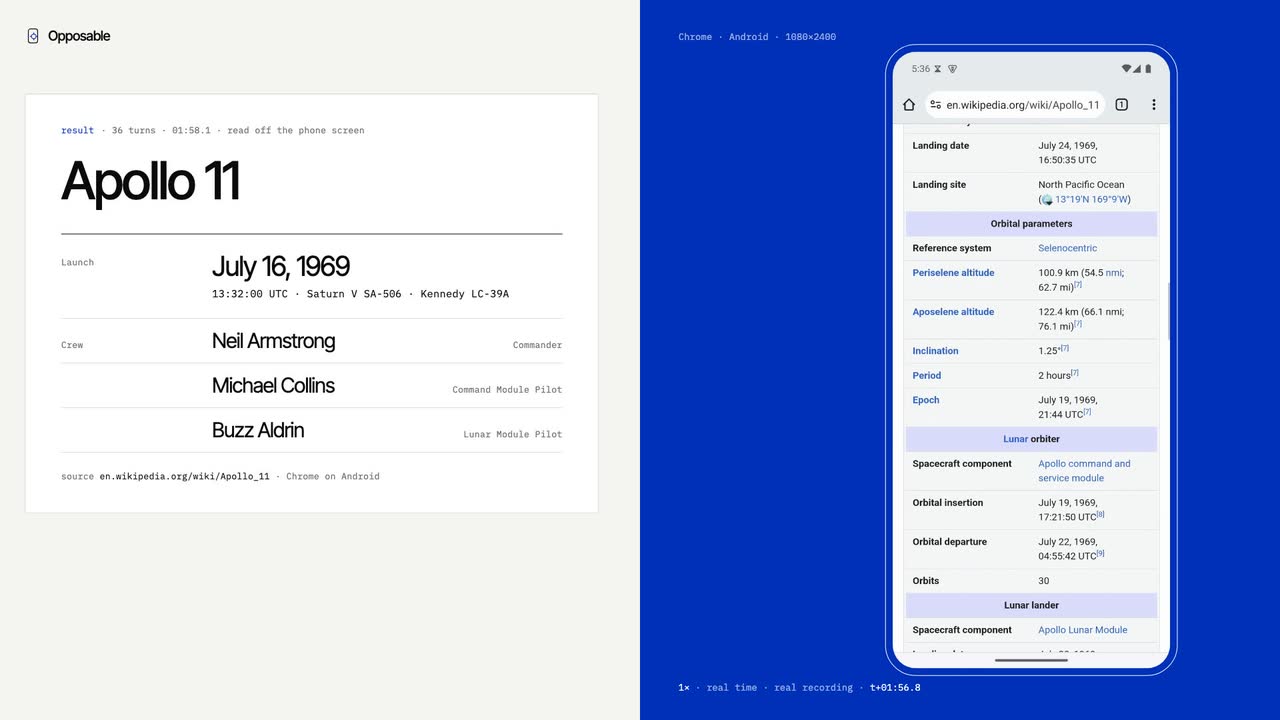
Looking something up the way a person would

Agent
Claude Code over MCP
Task
Chrome → Wikipedia → Apollo 11, read launch date and crew
Answer
16 July 1969 · Armstrong, Collins, Aldrin
Run
118 s · $0.44

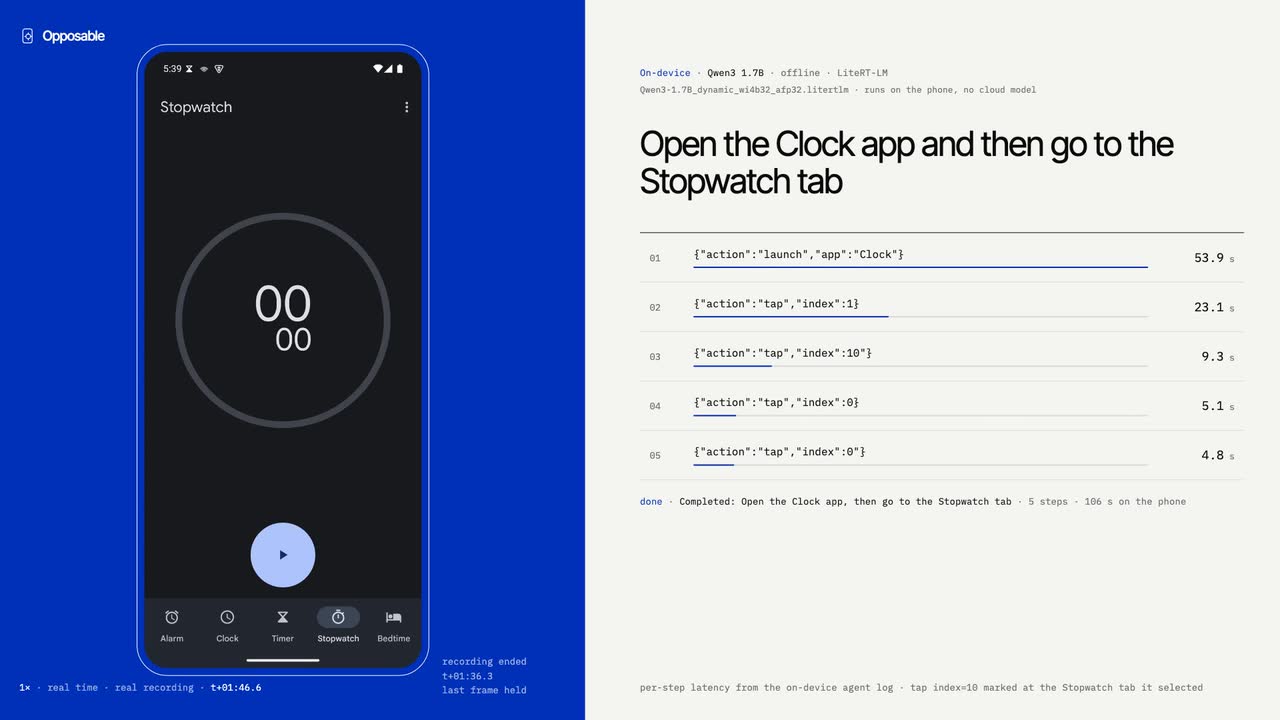
The model lives on the phone it operates

Agent
Built-in agent, on-device
Task
Open Clock, then the Stopwatch tab
Steps
5 · 54 s, 23 s, 9 s, 5 s, 5 s
Run
No network calls for inference

07On-device

Runs on the phone itself, even offline

Common steps run with no model at all, and each one checks its result on the screen. For everything else, our screen model on the phone looks at the screen and acts, and it gets faster with every release. Your screen never leaves the device.

BrainSizeReadsGood for
No model0 GBThe screenAlarms, timers, contacts, texts, settings, search: 1–30 s, checked on screen
Screen model1.4 GBScreenshotsSees the screen and taps like you; picks from the screen's labels in under a second when it can
Answer model0.7 GBTextAnswers questions from web results

08Log

What works, and when it started working

An entry goes in when something passes on a real device.

  1. A screen model that runs on the phone

    Our own inference engine: 31% less time per vision step than the stock pipeline, at equal accuracy on 36 graded screens. When the screen's labels are enough it picks the target in 0.8 s without a screenshot. Laptop CPU and emulator so far; real-phone numbers next.

  2. Phone tasks with no model at all

    Open an app, flip a setting, press a button, search: 11 of 11 test tasks done on the phone in 3–30 s without loading a model, each checked against the phone's real state afterwards.

  3. Reachable from anywhere

    The phone keeps one outbound connection to a relay, so Claude Code reaches it on mobile data or any Wi-Fi. No port forwarding. About 200 ms per tool call.

  4. It survives the real world: pop-ups and 2FA

    Permission dialogs, crash dialogs, nags and sign-in walls are flagged on every read; benign ones clear themselves. One-time codes are read from SMS or notifications. Verified in real agent loops.

  5. Agent loop 2.7× faster, 62 turns down to 18

    A persistent connection to the phone, a semantic screen model, and settling by screen content instead of waiting for silence. Three verified tasks: 139.8 s → 52 s, cost down 40%.

  6. First recorded run: dark theme and a timer

    Claude Code, 17 tool calls, 50 seconds, no shell shortcuts.

09Investors and partners

Computer use is coming to phones, and we're building the hands

Banking, rides, delivery, messaging, the two-factor prompt in the middle of every workflow. Reval Labs is building the layer that lets agents use them, on the phone you own and on phones we run for you.

  • Working softwareAndroid app with its own MCP server, on-device screen model, relay to reach any phone, and the Opposable Stick for iPhone
  • Two revenue linesA phone app that builds the developer base, and cloud phones as a subscription on the same tools
  • Model-neutralClaude, Codex, OpenAI-compatible endpoints and our own on-device model all drive the same surface

Investor & partner inquiry

Goes straight to the founders
I'm interested in
Or email investors@getopposable.com

10Questions

Before you hand over the phone

How do I install it?

On Android, download the app above and open it. Android asks once to allow installs from your browser. Then turn Opposable on in Settings › Accessibility, tap Connect, and paste the command it shows into Claude Code.

Does it work on iPhone?

In beta, with the Opposable Stick: a tiny USB Bluetooth stick you plug into your Mac, Windows or Linux computer. Your iPhone pairs with it as a keyboard and pointer, so your agent can tap and type in every app, and it sees the screen through screen mirroring or a USB cable. No jailbreak, no app on the phone. You buy the stick from its maker for about $8–13 and install our firmware from your browser. It's still beta, so expect rough edges.

Which agents can drive it?

Anything that speaks MCP. For Claude Code it's one claude mcp add --transport http command; Codex takes a few lines in ~/.codex/config.toml.

Do I need a model API key?

Not if Claude Code or Codex is driving. The built-in agent can use an on-device model with no key, Claude with your key, or any OpenAI-compatible endpoint, including Ollama on your LAN.

What exactly is a cloud phone?

A virtual Android phone that runs for you alone. You install apps and sign in through a browser viewer, then connect your agent to its private endpoint at https://<id>.opposable.run/mcp.

Is it safe to let an agent operate my phone?

Whoever holds the token can operate the phone, so treat it like a password. The server listens on localhost unless you allow the network, and payments always wait for your Approve tap.

Get your agent its thumbs

Free on Android today. iPhone is in early access with the Opposable Stick.